Compatible with Chrome and Edge
Instruction Guide
We have a simple tutorial guide which explains the features of the software extension and what each button inside the extension does. Read our tutorial and welcome guide on how to use the extension to the fullest. Use all the features of this browser software.
If you are interested in other web extensions to install, you might wish to check out the Microsoft Bing Search with Rewards extension.
Microsoft Bing Search with Rewards Extension
It allows you to complete daily offers to get points.
Track the number of points you have currently and the rewards you can redeem with these points.
The ways to get points & get rewarded is search with Bing, browse with Microsoft Edge and shop at the Microsoft and Windows stores to earn rewards.
Sponsored Link:
Other useful extensions
Another extension which would be useful to install is the iCloud bookmarks extension.
It allows to keep your Chrome bookmarks on Windows synced up with the Safari bookmarks on your iPhone, iPad, and Mac.
iCloud will store your website bookmarks so it is accessible even on your iPhone and Mac.
Try these other two extensions and see if it will boost your daily productivity.
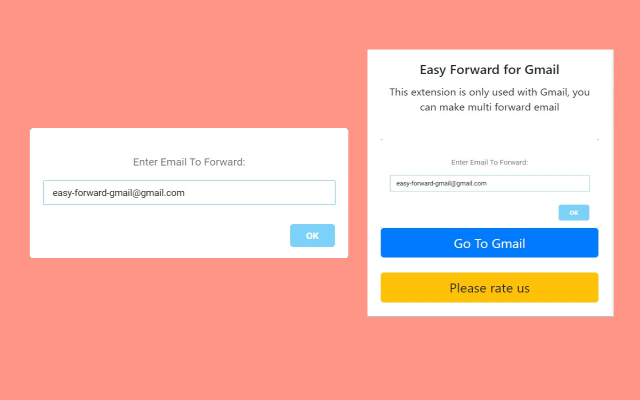
Add Forward button to your emails with one click.
Features:
Install and open.
- After installing the extension. You click on the extension icon to begin forwarding your emails quickly and efficiently.
If you're looking to forward emails to your entire team, there are a couple of options.
Forwarding email using Gmail filters
If you use Gmail, you can create a filter to forward an email to different people. This method works well if you have multiple people on your team who need to receive the same information.
It's important to note that this method only forwards an individual email, not an entire conversation. If you want to forward everything in an email thread, you'll need to copy and paste each message individually.
Most popular Email Services include
Gmail
Gmail is used by more than a billion people around the world. It’s one of the most popular email services in the world, and for good reason. Gmail offers tons of storage space, powerful search features, and great security options. Users can also access their Gmail on any device using a web browser. In addition, Google has added several new features to Gmail in recent years, including Smart Replies and Snooze.
Yahoo! Mail
Yahoo! Mail is one of the oldest and most popular email services in the world, with hundreds of millions of users worldwide. The service offers all of the basic features you would expect from an email account: calendar events, contact management, and message notifications. Yahoo! Mail also has a modern design that will look familiar to users who have used other Yahoo services like Yahoo Weather or Yahoo Finance.
Microsoft Outlook
Microsoft Outlook is one of the most popular business productivity tools available today — it’s used by over 600 million people across its various platforms (iOS app included). Microsoft Outlook is primarily designed for business use but can be used to manage personal accounts as well. The app provides many useful tools that are not available within other email clients such as advanced scheduling functionality
Tutorial:
- Install the Extension
- After installing the extension, click on the icon on the toolbar.
Sponsored Link: